The Atera platform detects gene expression at subcellular resolution at either the whole-transcriptome level (Atera WTA) or for a subset of targets (Atera Select).
On this page:
- Pre-designed and custom panel options
- Panel configurations
- Pre-designed panel gene and probe information
- Part numbers for Pre-designed, Custom, and Advanced Upgrade products
Refer to the Atera Gene Expression User Guide (CG001672) to execute the assay workflow, the Atera Instrument User Guide (CG001673) to run the instrument, and Software Analysis to view and analyze your Atera data.
The following panels are pre-designed by 10x Genomics, and can be used as-is:
- The Atera Human WTA Panel (whole-transcriptome assay) was designed to closely match the Chromium Flex Apex assay in terms of content. The number of probes per gene were optimized to maximize sensitivity of lowly expressed genes and avoid optical crowding risk for highly expressed genes.
- The Atera Select Human Multi-Tissue Panel (Panel A) was optimized for cell typing across 23 human tissues, including immune genes (e.g., cytokines and cytokine receptors).
Contact your sales representative to order custom Atera panels. If you do not know your sales representative, please contact customerservice@10xgenomics.com. The custom target options listed below are available for request. They are enabled by specific panel configurations (learn how below).
- To order a standalone custom panel with 50 to 1,000 genes, request a Panel C configuration.
- To order a standalone custom panel configuration with up to 2,000 genes (50 to 1,000 per panel), request a Panel A + Panel C configuration.
- Targets may be human or mouse genes, non-human/non-mouse genes, and/or advanced custom targets (see list here). Non-human/non-mouse options are available by requesting xenograft or endogenous sequence advanced custom targets.
As part of experimental planning, consider how panel selection affects the end-to-end assay, instrument, and analysis workflow. The Atera Instrument can run up to four slides at a time, which must all use the same panel configuration type. The panel configuration refers to the complete set of panel codebooks used in your experiment. The Atera platform provides a WTA panel codebook, Panel A codebook, and Panel C codebook (as well as a future Panel B codebook).
Follow these guidelines when deciding on panel configurations for your experiment:
-
Panel codebooks. The detection mechanism for a fraction of the Atera WTA codebook overlaps with the Panel A (and future Panel B) codebook. Thus, these panel types cannot be used together because the on-instrument analysis pipeline cannot tell which codebook to use to decode that subset.
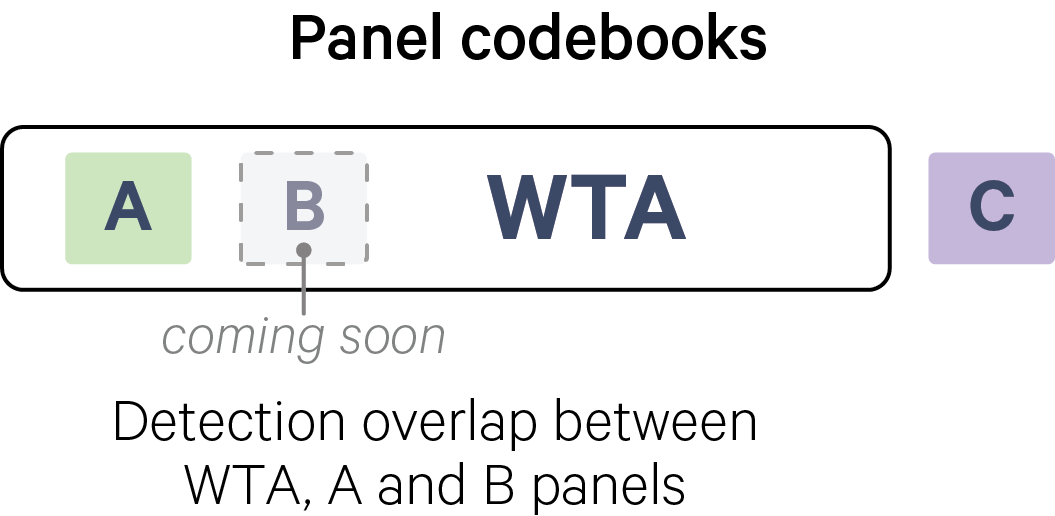
Do not combine: Panels with the same letter (e.g., Pre-designed Panel A + Custom Panel A), or WTA with any panel besides Panel C.
-
Acceptable Atera panel configurations. Each panel can be run individually*. Only combine these panels together: WTA panel + Panel C, or Panel A (pre-designed or custom) + Panel C.
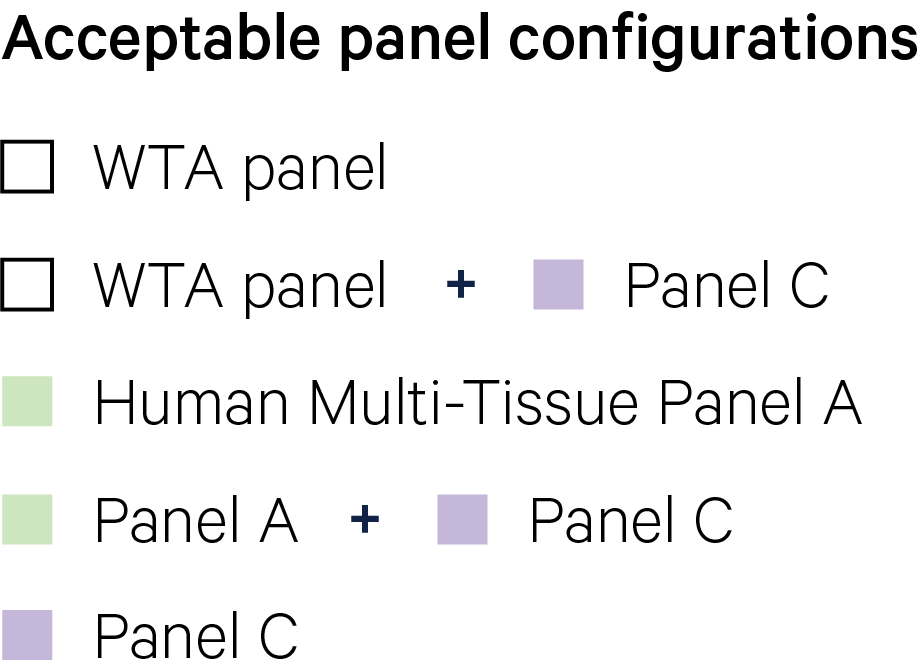
For WTA + Panel C and Panel A + Panel C panel configurations, contact support@10xgenomics.com for the concatenatedpanel_config.jsonfile. This file must be ready before starting an Atera Instrument run.
There are currently 5 panel configuration types:
Panel configuration type Approximate plexy Number of probe tubes WTA 18K genes 1 Panel A (pre-designed only)* 50 to 1K genes 1 Panel C 50 to 1K genes 1 WTA + Panel C 18K + (50 to 1K) genes 2 Panel A (pre-designed or custom) + Panel C 100 to 2K genes (50 - 1K genes per panel) 2 *The Atera Instrument currently does not enable running the custom Panel A configuration alone.
The table below provides information about the content of pre-designed Atera WTA and Atera Select gene panels:
- Panel name and the number of targeted genes
- Downloadable panel metadata with gene name, transcript Ensembl ID, number of probe sets, and number of codewords for each target in CSV format (see below for details).
- Downloadable
panel_configJSON file for each panel. - Panel probe sequences in FASTA format.
| Panel | Genes targeted | Panel metadata and JSON | Probe genomic target sequences |
|---|---|---|---|
| Atera Human WTA Panel | 18,049 | CSV file, JSON file | FASTA file |
| Atera Select Human Multi-Tissue Panel | 1,035 | CSV file, JSON file | FASTA file |
These genes are not included in the Atera Human WTA Panel:
- TCR joining and majority of variable regions
- IG joining and variable regions
- Ribosomal proteins
- Mitochondrial ribosomal proteins
- Read-through genes
- Non-coding RNA
The WTA pre-designed panel contains 6,390 negative control codewords, 81 negative control targets, and 61 genomic control probes. The Select pre-designed panel contains 500 negative control codewords, 40 negative control targets, and 20 genomic controls.
- For negative control targets, multiple probes are designed for each non-biological target sequence. This follows the same design process as for real Atera target sequences, with a goal of reaching five probe sets per gene.
- Genomic control probes are designed to bind to intergenic genomic DNA, but not to any transcript sequence present in the tissue. They are not designed to only target non-homologous regions of the genome.
- For any custom panel request, 10x generates the negative control targets for the design; customers do not need to specify these in design requests.
For each of the pre-designed panels, a metadata file is provided on this page in CSV format. This file contains additional panel information, which may be helpful for designing your experiment and custom gene list.
| Column | Description |
|---|---|
| Gene | The gene identifier targeted by the probe. |
| Ensembl ID | The Ensembl gene identifier targeted by the probe. |
| Number of Probe sets | The number of probe sets targeting each isoform of the gene. |
| Number of Codewords | The number of codewords used to decode each gene. |
Part numbers for pre-designed, custom, and advanced upgrade products are shown below.
Pre-designed panels
| Product PN | Product name |
|---|---|
| 1000976 | Atera Human WTA Panel (2 reactions) |
| 1000977 | Atera Select Human Multi-Tissue Panel (2 reactions) |
Custom panels
| Product PN | Product name |
|---|---|
| 1001180 | Atera Custom RNA Panel A (4 reactions) |
| 1001183 | Atera Custom RNA Panel A (40 reactions) |
| 1001182 | Atera Custom RNA Panel C (4 reactions) |
| 1001185 | Atera Custom RNA Panel C (40 reactions) |
Advanced Panel Upgrades
An Advanced Panel Upgrade is only necessary for customers requesting additional advanced target sequences for their custom panel design. The part number itself is not associated with extra panels or reagents.
| Product PN | Product name |
|---|---|
| 1001255 | Advanced Panel Upgrade |